Florin Stoian — UI/UX designer

I design it.
Then I build it.

I'm a UI/UX designer, but I don't stop at the Figma file. I take an idea all the way to a working product: I design it, then I build it by directing AI (people call it vibecoding). I make every call, the AI does the typing. I also care a lot about the parts most people skip, like empty screens, error messages, and what the app does when something breaks.

01 — 02

Selected work

01 / NOTCH — iPhone app, made solo

A ledger, not a game.

A workout-logging app for serious lifters, built for iPhone. I made the whole thing on my own: the idea, the brand, the design, and the app itself.

  • RoleAll of it, solo — product, design, brand, and the app (built with AI)
  • PlatformiPhone · SwiftUI
  • Scope0 → 1 · from nothing to a real app
  • StatusFinal pre-launch · 2026
Notch — Log it. Prove it. Keep it. A native iOS strength log with The Keeper ram mascot and brand tags: no streaks, no feed, RIR-aware PRs, your record kept
01 The idea — what it is & who it's for
What it is

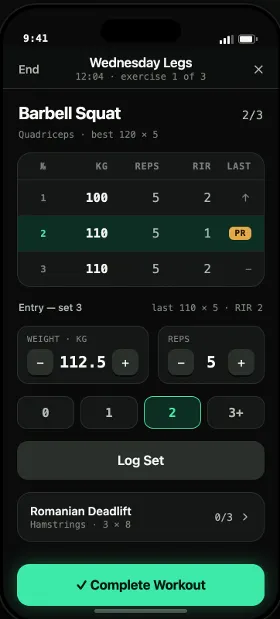
You log a set in two taps, including how many reps you had left in the tank (that's RIR). Then the app tells you the thing most won't: are you actually getting stronger, or just turning up? It keeps the whole record, for good.

Why it's different

Most logging apps try to keep you hooked with streaks, badges and a feed. Notch has none of that. My thinking was simple. A serious lifter already knows if they showed up. What they want is proof they're improving. So the app skips the dopamine and just does the maths.

Who it's for

People who already lift seriously and track it, and are tired of apps treating them like beginners. It's not built for day-one gym-goers or the smartwatch crowd. It works on your phone, and that's on purpose.

Tagline: Log it. Prove it. Keep it.

02 The brand

The name does a lot of the work. A ram's horn grows a ring every year it lives, and your training is the same: every session is one more notch. So the mascot is a ram (I call him The Keeper) and the logo is a notched horn. The look is something I called Paper Terminal: warm cream paper, read like an old computer screen. Mono type, thin black lines, labels in brackets. My one rule was that colour always has to mean something, so it's never there just to look nice.

Notch brand system — horn mark, The Keeper mascot, palette, type and voice
The Notch brand: the mark, the mascot, the colours and the type.
03 The app — what it does

The whole app runs on one move: log a set, and see right away what it was worth. Because it knows how hard the set felt, it can tell a real personal best from a fluke.

  • Effort-aware loggingTap in how many reps you had left. Now the app knows how hard it was.
  • Quiet PRsPersonal bests show up calmly, by rep range. No confetti.
  • Honest max estimateYour estimated max over time, adjusted for how hard each set felt, so an easy day doesn't look like progress.
  • Stall detectionTells you when a lift has stopped moving, going off the trend instead of one bad day.
  • TrendsWeekly volume and your estimated max over time. The big picture.
  • Kept for goodRoutines, your own exercises, a CSV export, and a backup so none of it dies with your phone.
Notch — the logging screen, an exercise's history with its estimated-max trend, and the trends view
Straight from the app: the workout screen, an exercise's history, and the trends view.
04 How it solves the problem

Most apps answer one thing: did you show up? Notch answers the one that counts: did you get stronger? It takes a single logged set and turns it into a straight answer, plus a record you keep even if you delete the app.

Diagram — a typical app answers ‘did you show up?’ with streaks and badges; Notch answers ‘did you get stronger?’ from your logged sets, and keeps the record
Same set of data, two very different answers.
05 The build — vibecoded, solo

I built Notch by vibecoding. I made the decisions, the AI wrote the code. Because I'm doing both the design and the build, there's no hand-off, and nothing gets lost in translation between the Figma and the real app. That's how one person ships a proper iPhone app. Here's what it's made of:

  • SwiftUIThe design lives in the code, so the screens are the spec.
  • SwiftDataSaves everything on the phone, so logging is instant and works offline.
  • StoreKit 2Handles the subscription and the free trial.
  • SupabaseSign-in and cloud backup, so your data follows you to a new phone.
  • PostHog · EUOpt-in analytics, so I can see what's helping without being creepy about it.
  • Cloudflare PagesRuns the site and waitlist at notchlift.app.
06 What I cut

The hard part was deleting things. I built a streak counter, liked it, then killed it, because a streak is exactly the game I was trying to get away from. I cut the exercise list from 873 down to 438, keeping only the ones I'd actually program myself. A few features I was excited about got pushed to after launch. When I wasn't sure something earned its place, it didn't make it in.

07 Where it's at
  • Done The full design system, a dark mode, and every feature built.
  • Done Exercise list trimmed to 438. Brand, mascot and site all live.
  • Now Testing on real phones and getting it ready for the App Store.
  • Next Launch, then the roadmap of things I cut to get there.
02 / THE CONQUEROR — web redesign

From catalogue to funnel.

The Conqueror is a virtual fitness-challenge site. You walk, run or cycle the distance of a famous route, and a real medal turns up at your door. I redesigned its two busiest pages, the homepage and the all-challenges catalogue. Both were meant to win over cold traffic, and both were drowning people in choice.

  • RoleUX/UI designer — research, design, A/B testing
  • PagesHomepage & the all-challenges catalogue
  • TeamPast job · shipped with a developer and a CRO
  • Year2025
01 The problem — too much, too soon

The job was to win over cold traffic: people landing from a search or an ad who'd never heard of the brand. The old homepage did the opposite. It threw sixty-plus challenges at you in one dense grid, every card just saying “LEARN MORE.” No pitch, no “how it works”, nothing telling you where to look first. And the things that actually sell the product, like the 450k-member community, the medal you earn, and the licensed challenges (Lord of the Rings, Harry Potter), were buried or missing. Show someone everything and they pick nothing.

theconqueror.events — beforescroll ↕
The Conqueror — old homepage: a dense grid of 60+ challenge cards with no clear order
Before: every challenge at once, nowhere to look first.
02 The approach

So I stopped treating it like a catalogue and started treating it like a path. Where does a first-timer get stuck, and what do they need to see next? Four things guided the redesign.

  • Lead with the pitchOpen with what it is and a quick “how it works”, before the list of challenges.
  • Pick a few, don't dump them allShow the popular and licensed ones first. The full list is one click away.
  • Prove it's realPut the numbers, the press and the reviews near the top.
  • Give it roomSections you can scan, with one clear thing to do at each step.

How it went: I read the analytics, did the research, designed, then A/B tested. Shipped it with a developer and a CRO.

03 The redesign — homepage

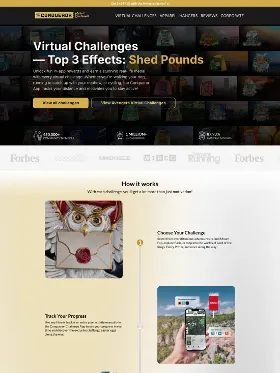
The new homepage actually walks you through it. A clear pitch at the top, then a five-step “how it works”, then the proof: 450k members, an 87.93% completion rate, and logos from Forbes, Wired and Runner's World. After that, a handful of popular and licensed challenges, reviews, a money-back guarantee, and the FAQ. The full catalogue is still a click away under “View all challenges.” It just stopped being the first wall you hit.

What I cut: the wall. Every challenge used to sit on the homepage. I moved the full list behind one click, so the page could finally do its job.

theconqueror.events — afterscroll ↕
The Conqueror — redesigned homepage: clear pitch, how-it-works, social proof, a few featured challenges
After: a clear pitch, a “how it works”, the proof, and a short list of challenges.
04 The redesign — the catalogue

The catalogue got the same thinking. The old All-Challenges page was a flat grid of medal thumbnails on white. It worked, but it sold the medal instead of the feeling of earning one, and your eye had nowhere to land. The redesign leads with photos of real people holding their medals, a line reminding you you're joining over a million others, cleaner cards, and a few nudges like bundles, discounts and “new” tags. Now it reads like a trip worth taking.

/all-challenges — beforescroll ↕
The Conqueror — old All Challenges page: a flat grid of medal thumbnails on white
Before: medal thumbnails on white.
/all-challenges — afterscroll ↕
The Conqueror — redesigned All Challenges page: real photos, dark cards, social proof and merchandising
After: real photos, social proof, and a bit of merchandising.
05 Outcome

We A/B tested the new homepage against the old one. Click-through from organic traffic went up 68%. Giving first-timers a path to follow, instead of a wall to bounce off, did the work.

+68%click-through vs the old page (A/B tested)
organiccold traffic from search and ads
2pages — homepage and catalogue
·

About

I'm a UI/UX designer. I care about the boring parts of a product as much as the nice screens, like the empty states, the error messages, and the bits that break when real people use it. I like making things that take a clear stance, and I can talk you through why I did what I did.

What I do
  • Product & UX design
  • UI & visual design
  • Design systems
  • Prototyping
  • Brand & identity
How I build
  • Figma
  • Vibecoding (I direct, the AI codes)
  • SwiftUI & web
  • Claude Code / Cursor

Let's talk

Got something you
want built right?